> For the complete documentation index, see [llms.txt](https://docs.multitudes.com/llms.txt). Markdown versions of documentation pages are available by appending `.md` to page URLs; this page is available as [Markdown](https://docs.multitudes.com/metrics-and-definitions/process-metrics/flow-of-work/change-lead-time.md).
# Change Lead Time
{% hint style="info" %}
⭐️ This metric is one of the [4 Key Metrics published by Google's DevOps Research and Assessment (DORA)](https://dora.dev/guides/dora-metrics-four-keys/) team.
You can see all 4 key DORA metrics on the [DORA Metrics page](https://app.multitudes.co/DORA) of the Multitudes app.
{% endhint %}

********What it is:** This is DORA's `Change Lead Time` (previously called `Lead Time` in the app), a metric that shows how long it takes the team to write code, request and give feedback, make revisions, merge the PR, and then deploy into production. It’s an indicator of how long it takes to deliver value to customers.****
**Why it matters:** `Change Lead Time` is one of the top four indicators of software team performance, according to [Google’s DORA research](https://cloud.google.com/devops/) (the DevOps Research and Assessment research). Their research shows that a faster `Change Lead Time` is correlated with better business outcomes. Specifically, teams with a faster `Change Lead Time` do work that is better, more stable, and more secure. If you want to dive deeper into this, check out the [Accelerate](https://itrevolution.com/book/accelerate/) book. Note that this is closely related to `Cycle Time`; we measure `Change Lead Time` since that's recommended by DORA. [See here](https://www.multitudes.com/blog/lead-time-vs-cycle-time) for more about the differences between `Change Lead Time`, `Cycle Time`, and `Lead Time`.
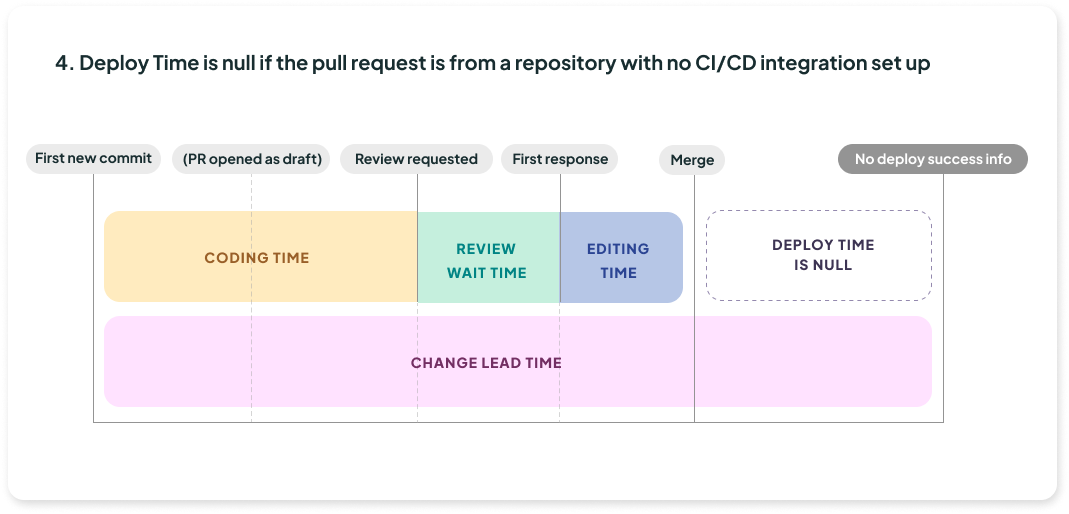
**How we calculate it:** To calculate `Change Lead Time`, we measure the **number of hours from the first new commit** on a pull request’s (PR’s) branch **to a successful attempt of deployment to production for that PR, or to PR merged** if there is no deployment data.
{% hint style="info" %}
This means some of the PRs included in this chart will not yet be deployed. This is so that you can get insights for all repositories, even ones that don’t have workflows configured. You can get a breakdown of how long PRs are taking to merge vs. deploy with the Change Lead Time subsets chart or the specific line charts (like [this one for deploy time)](/metrics-and-definitions/process-metrics/flow-of-work.md#deploy-time).
{% endhint %}
{% hint style="info" %}
Because the end point for Change Lead Time is a merge (or a successful attempt to deploy to production if available), the metrics will not include PRs that were closed (i.e not merged)
{% endhint %}
{% hint style="success" %}
**What good looks like**
The latest DORA research ([from 2025](https://dora.dev/research/2025/)) shows that the top 15% of responses have a `Change Lead Time` of less than 24 hours.
{% endhint %}
### **Additional calculation notes for Change Lead Time & subsets**
Here are a few additional notes that affect the calculations for `Change Lead Time` and/or its components, `Coding Time`, `Review Wait Time`, `Editing Time` and `Deploy Time`.
These exclusions apply to `Coding Time`, `Review Wait Time`, and `Editing Time`:
* Our focus is on PRs that the team collaborated on, so we exclude bot merges and selfie-merges (PRs merged by the PR author, with no comments or reviews by other collaborators).
* If you like, you can choose to exclude weekend hours from these calculation; simply toggle on “Exclude Weekend Hours”.
For just `Change Lead Time` and `Coding Time`, please note:
* For the most accurate `Change Lead Time`, open a PR (even a draft) right after your first commit, then push subsequent commits as you make them. This lets us associate each commit with the PR, so any later squash or rebase won't affect `Change Lead Time`.
* If commits are squashed before a PR is opened, the original timestamps are generally lost. While there are approaches that may preserve the original timestamp (such as locally squashing via `git rebase -i` ), treat pre-PR squashing as timestamp-destructive by default.
* This means that for both the historical data ingestion process (the first 6 weeks) and the ongoing ingestion process, commits squashed before the PR is opened will show an artificially low `Coding Time`. By definition, `Coding Time` is measured from the first commit to PR open. Because we lose the true first commit timestamp on squashed commits, we have to use the timestamp of the squashed commit, which is later – that's what makes `Coding Time` artificially low. This can't be corrected retroactively for historical data.
For `Review Wait Time`, please note:
* The counting for the `Review Wait Time` starts when a review is first requested. If a review was never requested (i.e. when someone provides a review without being asked to review), we fall back to counting from the time the PR was first opened or when it was first moved to "Ready for review" if it was initially a draft PR.
For just the separate `Deploy Time` line chart:
* If you’re using the [GitHub Actions integration](/integrations/github-actions.md)…
* We do include selfie PRs (non-collaborative PRs) in this metric.
* This is because we want to provide the most comprehensive view of how long your deployment pipeline takes, which means incorporating all relevant data.
* Whether a deploy is of a collaborative PR or a selfie PR, this should not normally influence how long the deploy takes, therefore selfie PRs are a relevant segment of your team’s data on how long things take to deploy.
* If you're using the [Deployments API](/integrations/deployments-api.md), we only look at what you POST, so you can decide how you want to treat selfie PRs
* For `Change Lead Time` we intentionally include all merged PRs, even if they are not yet deployed (or if [deployment metrics aren’t available](/metrics-and-definitions/deployment-metrics.md)), so that you are getting insights across all repositories, even if some of them are not set up with GitHub Actions deploy pipelines or the Deployments API.
### **How Change Lead Time is broken into its subsets**
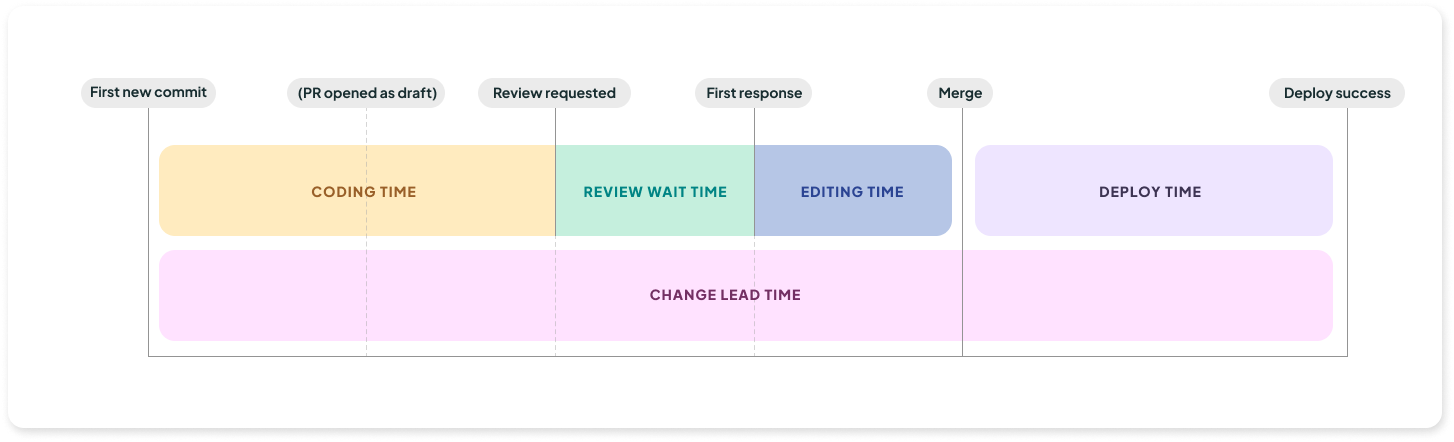
`Change Lead Time` is broken up into its four components, `Coding Time`, `Review Wait Time`, `Editing Time`, and `Deploy Time`. Where these start and end can depend on the events in each PR's life cycle. Here is a typical PR timeline. Click the dropdown below it for more scenarios.
Timeline showing Change Lead Time begins at the First new commit and ends when deployed.
{% hint style="info" %}
The Change Lead Time by subset chart in the app shows the percentile value for each component, `Coding Time`, `Review Wait Time`, `Editing Time`, and `Deploy Time`. So if it’s showing P50, the 50th percentile or median, the chart shows that for each sub-component.\
\
The sum of these components may not equal the overall `Change Lead Time` shown in the Change Lead Time line chart because of how percentiles work.
{% endhint %}
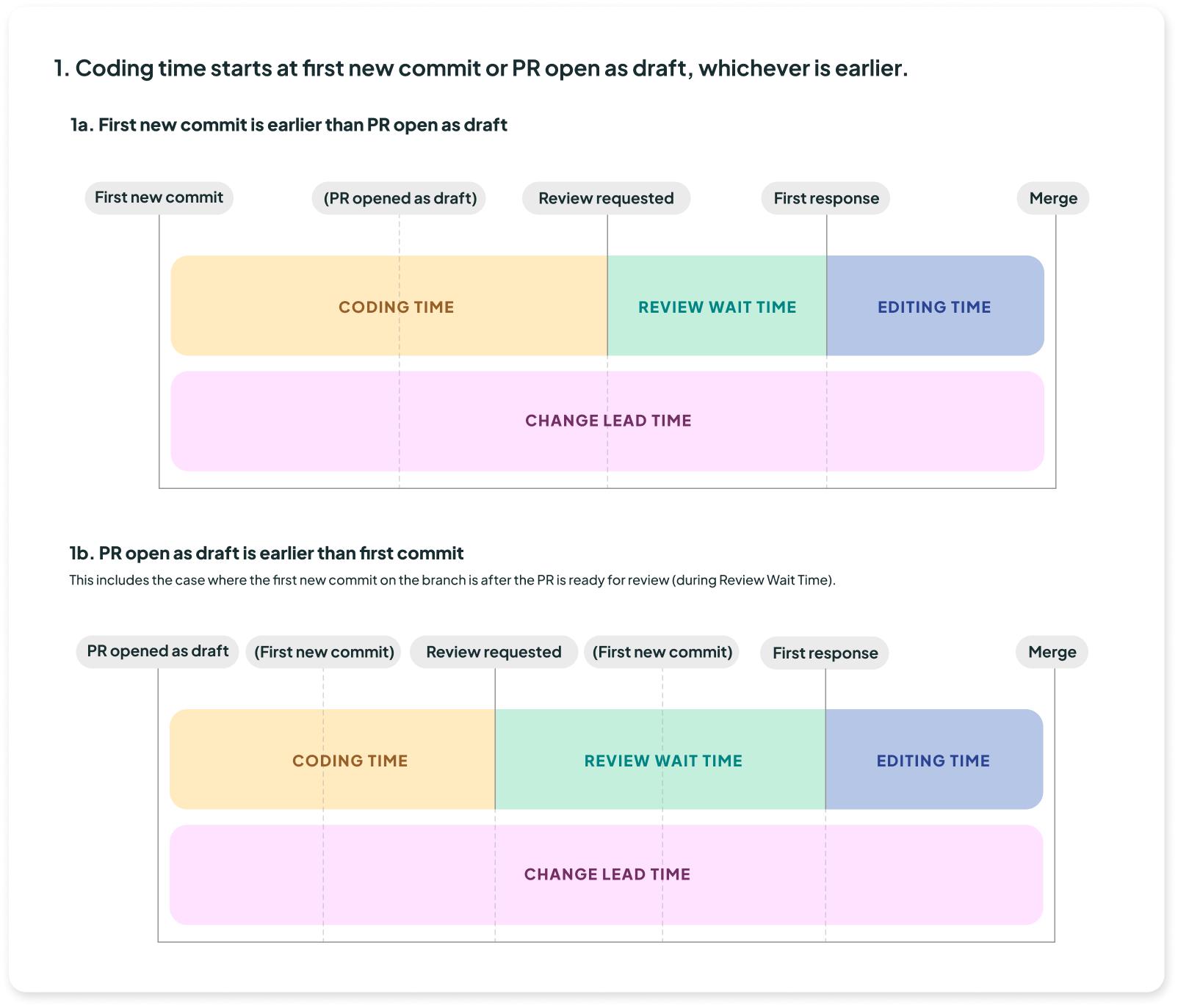
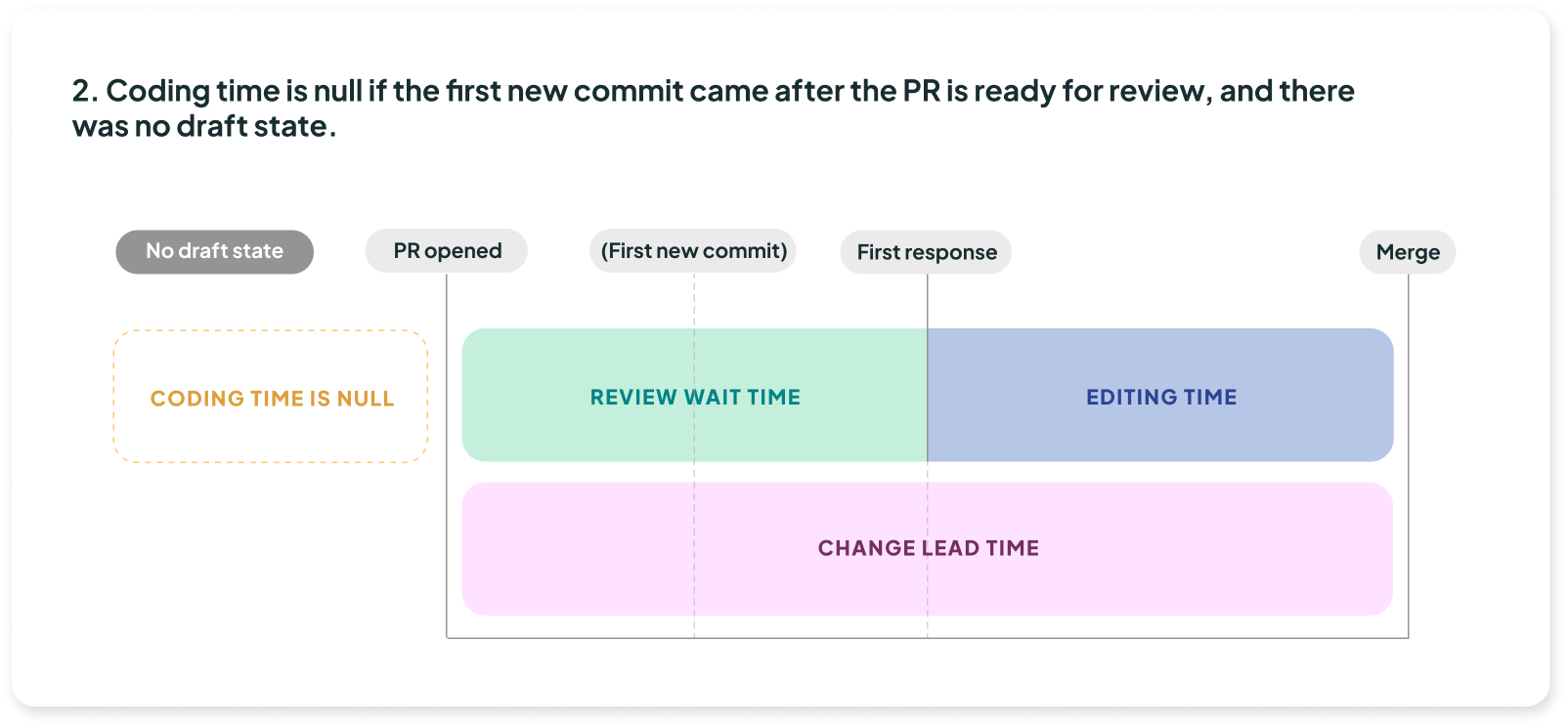
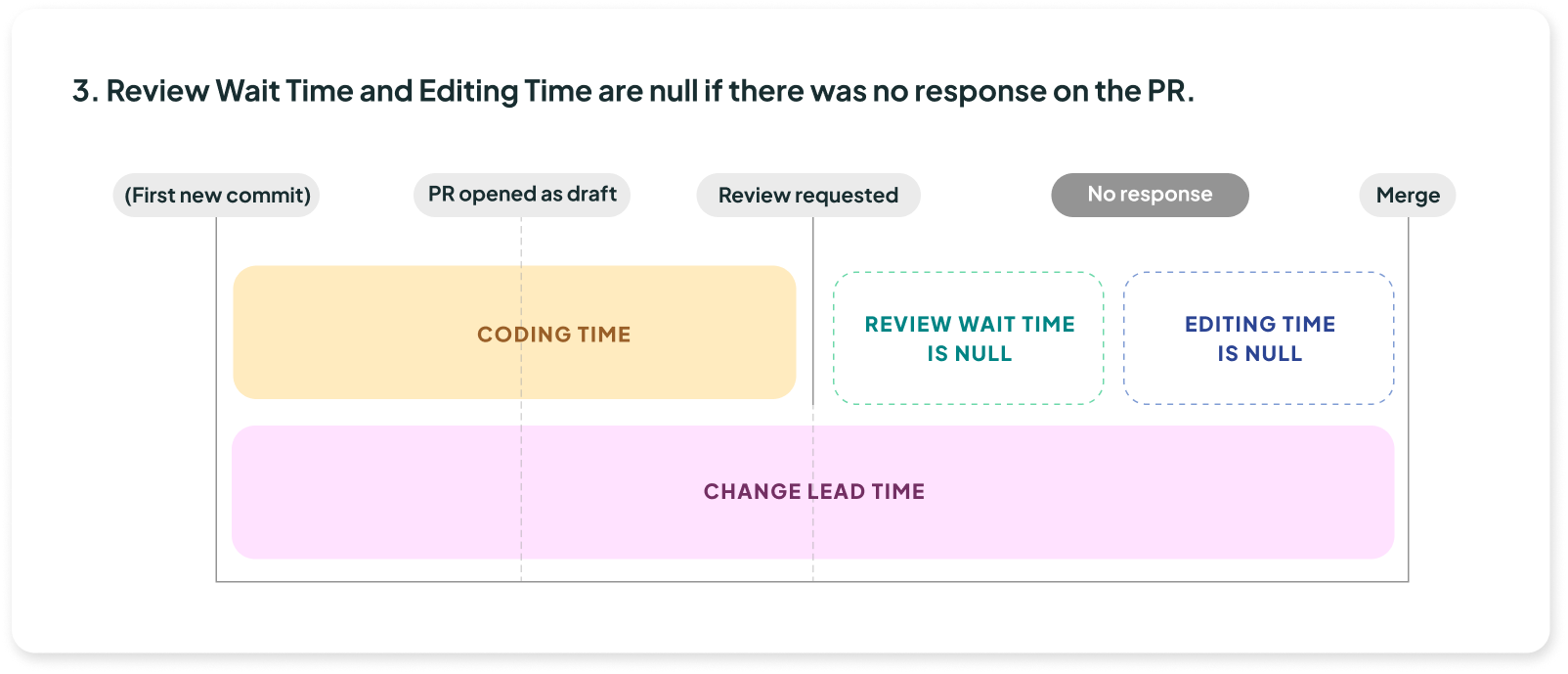
## More PR life cycles scenarios
{% tabs %}
{% tab title="Scenario 1" %}
{% endtab %}
{% tab title="Scenario 2" %}
{% endtab %}
{% tab title="Scenario 3" %}
{% endtab %}
{% tab title="Scenario 4" %}
{% endtab %}
{% endtabs %}