> For the complete documentation index, see [llms.txt](https://docs.multitudes.com/llms.txt). Markdown versions of documentation pages are available by appending `.md` to page URLs; this page is available as [Markdown](https://docs.multitudes.com/metrics-and-definitions/ai-impact-feature/ai-impact.md).
# AI Impact
Learn more about the impact your AI initiatives are having on your other Multitudes metrics.
Understand how AI tools affect outcomes, by looking at their impact on leading and lagging indicators of productivity, quality, and developer experience.
Multitudes conducts [ongoing research](https://www.multitudes.com/research) into the impact of AI on engineering teams. Our findings show that the actions you take as a leader have the biggest impact on the success of your AI rollout – not your tooling. With the right initiatives, you can help your team get more benefit from AI, with fewer of the costs (to codebase quality, learning, and more).
But to do that, we need to be able to measure and compare the impact of each of our AI initiatives. This feature helps you do just that, with holistic metrics looking across productivity, code quality measures, and developer experience.
Note that we found it is important to control for interventions by looking at pre-and-post metrics. We share more about that below.
## High and Low AI Usage Cohorts
Multitudes automatically classifies users into two cohorts based on their AI tool usage patterns over the most recent 12 weeks:
* **High AI Adopters**: Users with AI activity that is greater than or equal to (≥) the target percent over the days in the last 12 weeks
* **Low AI Adopters**: Users with AI activity that is less than (<) the target percent over the days in the last 12 weeks
#### Why is the default target 35%?
Based on our recent [AI impact research](http://multitudes.com/data-to-cut-through-the-hype), we found that 50% Daily Active Users (DAU) was a strong predictor of meaningful AI usage when measuring only workdays (and excluding weekends).
Since our feature calculates DAU across all calendar days (including weekends and holidays), we adjusted this threshold to 35% to reflect realistic usage patterns while maintaining the same signal of engaged adoption. (5 weekdays / 7 days of the week = 71% – so 50% of that is \~35%).
A [custom target](/configuration-and-setup/customize-targets.md) can be set on the AI impact page if desired.
#### Calculation Notes
* Cohorts are defined **globally across your entire organization**, not per team. This means that you have a consistent view of who's a high AI adopter across teams. When you apply team filters, you'll see a subset of these global cohorts.
* Historic team changes will not affect the cohorts due to them being filtered based on the current team state. This ensures we are comparing the same team members in each cohort in the pre and post intervention periods.
* If multiple AI tools are integrated, DAU is calculated across **all tools combined**.
* Low AI Adopters who consistently increase their usage will eventually graduate to the High AI Adopters cohort — this is a sign of adoption initiatives working.
* Currently we are unable to provide an "exclude weekends" option as the data we obtain from most providers has already been aggregated at a daily level in UTC. The lack of granularity here means that we are unable to redistribute it to the actual days in local timezones.
## Adding AI Interventions
### Why this matters
Success with AI isn't one-and-done; it's not that you roll out an AI tool and your work is complete. The pace of change with AI means that we need to treat this like a learning exercise – running experiments, and then iterating to help our teams get more out of these tools.
That's why we allow you to add AI interventions in Multitudes. This might be the date you rolled out an AI tool, but it might also be an enablement activity, like the date you ran an AI hackathon or the date you started doing weekly AI demos on your team.
Adding these interventions in Multitudes are the top thing you can do to help your team learn more about what works with AI – because when you add them, we calculate the impact of that specific intervention. Along the way, we bake in all the best practices from our [AI impact research](https://cdn.prod.website-files.com/610c8a14b4df1ae46b1a13a3/6941b0b2e9129ebfdfa71d4f_864f3a86793178cb6d8dcc1b464038be_What%20matters%20most%20for%20AI%20rollouts%20How%20you%20lead%20-%20Multitudes%20Whitepaper.pdf), including showing you a holistic set of outcome metrics, across productivity, quality, and developer experience. This helps you see what trade-offs might be happening.
### How to add an AI intervention
There are multiple ways to add an AI intervention:
#### (1) From the AI impact page
The easiest way to add an AI intervention is from the [AI impact page](https://app.multitudes.co/ai-impact/impact). Go there, then click the "add intervention" button on the top right corner of the screen.
This will pop-up a modal for you to include the details of your intervention such as the intervention date, which team(s) this relates to, and a description. Ensure the "Is this an AI intervention?" box is checked before pressing "Add annotation".
Once you've done this, you can select the intervention from the AI intervention dropdown and then the charts on the page will update to show the impact of that intervention.
#### (2) From charts
You can also add an AI intervention using the annotations feature available on most of our charts. Hover your mouse over the bottom axis of a chart, and you will see a prompt to add an annotation. Click "Add annotation", and the same modal as above will appear. Fill in the details of your intervention, ensuring that the "Is this an AI intervention?" box is checked.
### How the charts change with interventions
**When no intervention is selected:** Charts will show metrics for Low AI Adopters, High AI Adopters and all AI users for comparison.
**When an intervention is selected:** Charts will show Pre (12-week period leading up to the internvetion date) and Post (the full period after the intervention date) metrics for Low AI Adopters, High AI Adopters, and all AI users for comparison
## Measuring Impact on Adoption
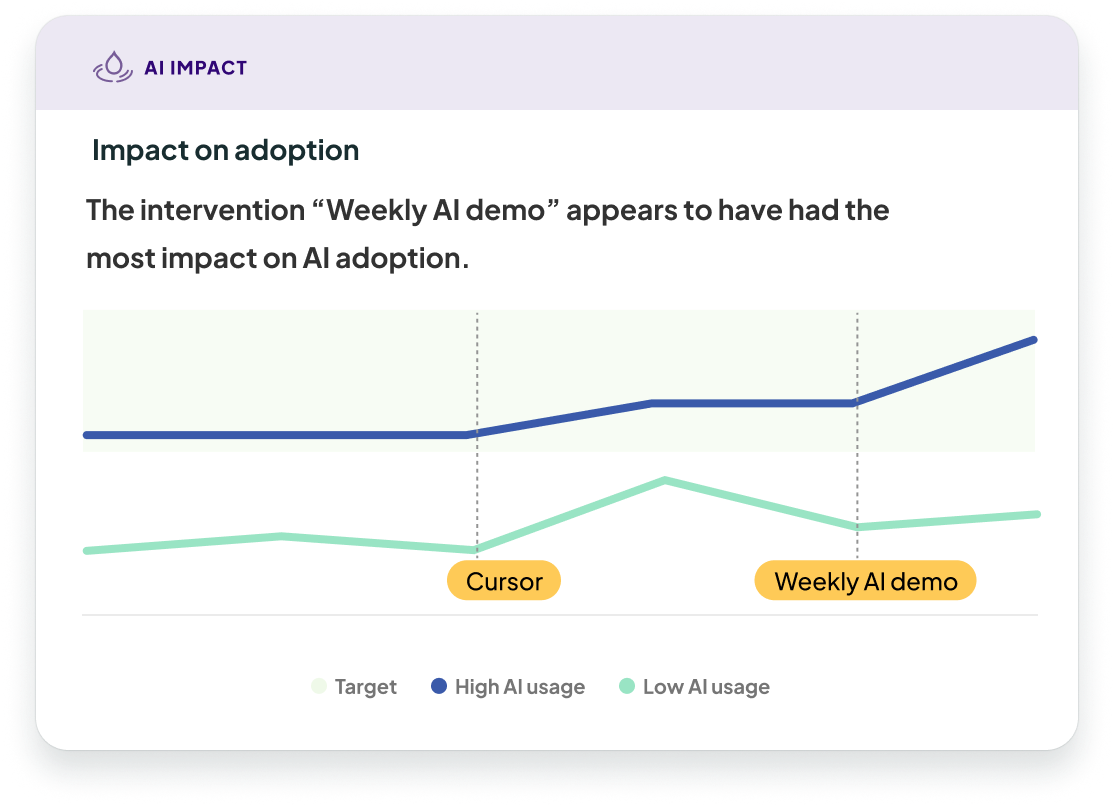
This time series chart tracks Daily Active Users (DAU) over time, broken down by the "High" and "Low" AI adoption cohorts. It helps you understand adoption momentum and, when interventions are present, how they've impacted AI adoption. This is important to measure because we look at other impact metrics, because if an intervention didn't increase AI adoption, then we can't claim that it led to the follow-on outcome metrics.
#### What You See
The chart shows:
* **Two trend lines**: One for High AI Adopters, one for Low AI Adopters
* **Current DAU percentage** for each cohort
* **Intervention markers** (when annotated) show when your organization introduced new tools, training, or process changes
## AI Impact Measurement
Using box-and-whisker plots, we show how AI interventions impacted key performance metrics.
The page supports two analysis modes: cohort-based comparisons (viewing High vs Low AI Adopters at a single point in time) and pre/post intervention analysis (tracking how each cohort changes after a specific action). Pre/post analysis provides stronger evidence for causality by controlling for pre-existing differences between groups, but we default to the simpler high vs low AI adopter view because the pre/post data isn't always available.
#### Why We Use Pre/Post Intervention Analysis
A common mistake in measuring AI impact is simply comparing High AI Adopters to Low AI Adopters and attributing all differences to AI usage. **This approach can be misleading.**
The people who choose to use AI more are likely different from those who use it less — and these differences existed *before* AI was introduced. For example:
* High AI Adopters might be more productivity-focused or excited about new technology
* They might work in codebases or languages where AI performs better
* They could be newer to a project and seeking help getting up to speed
These pre-existing differences create [selection bias](https://catalogofbias.org/biases/selection-bias/). The high and low usage groups likely started with different metrics even before AI existed, which means comparing them directly confounds AI's actual impact with these other factors. For more about this issue, [read our blog post](https://www.multitudes.com/blog/practical-stats-how-to-actually-measure-ai-impact).
{% hint style="info" %}
**Real-world example**: In one organization we worked with, High AI Adopters initially appeared to have smaller PR sizes than Low AI Adopters — suggesting AI reduced PR size. But when we examined pre-intervention data, we discovered High AI Adopters *started out* with much smaller PRs before the AI rollout. Post-intervention, their PR sizes actually *increased* compared to their our pre-AI data. Without controlling for pre-existing differences, we would have made the wrong conclusion about the impact of AI.
{% endhint %}
This is why Multitudes emphasizes **pre/post intervention analysis**: by comparing each cohort to their own baseline, we control for pre-existing differences, which can help isolate AI's actual effect.
#### When you don't have intervention data
If you're viewing the page without configuring an intervention, you'll see direct comparisons between High and Low AI Adopters. This view is still valuable for understanding patterns and generating hypotheses, but remember:
* **Be cautious about causality**: Differences could come from pre-existing factors, not AI itself
* **Use it for exploration**: Identify interesting patterns worth investigating further
* **Consider setting up an intervention**: Our AI impact research showed that what drives AI adoption isn't tool availability but enablement – so we recommend everyone run an AI intervention. And even small experiments (like a training session) create natural pre/post periods that strengthen your conclusions about Ai impact.
The charts comparisons help you spot where differences exist, whereas running an intervention can help you understand *why* differences exist.
#### How metrics are visualized
Different metrics use different visualization approaches based on how the data is measured:
**Box-and-Whisker Plots**: We use these when we have enough underlying event data to construct a box-and-whisker. We use this for charts where we have individual, event-level metrics – specifically:
* PR Size: Each individual PR has a measurable size
* Change Lead Time: Each individual PR has a lead time
**Bar Charts**: We use these when the given metric is an aggregate, so it makes more sense to roll up all the data over the relevant time period (because we need a larger observation window before there's enough data for a meaningful box-and-whisker). We do this for charts including:
* Merge Frequency: This aggregates based on PRs per week/month and controls for different-sized teams by dividing by contributor count.
* Feedback Quality Given: This chart aggregates based on the quality of feedback (e.g., count of highly specific reviews or minimal reviews) divided by the total number of reviews.
* Change Failure Rate: This chart aggregates by looking at the number of failures divided by the total number of changes.
* Out-of-Hours Commits: This chart, like Merge Frequency, aggregates based on a count per week/month and divides by contributor count to control for different team sizes.
### Understanding Box-and-Whisker Plots
Box-and-whisker plots visualize the **distribution** of data, helping you understand not just the average, but the full range of typical values.
#### Reading the chart
* **The box** represents the middle 50% of values (from the 25th to 75th percentile) – this range is called the interquartile range (= the 75th percentile value minues the 25th percentile value)
* **The line inside the box** shows the median (the 50th percentile) — the mid-point value for that group. 50% of the datapoints sit above this line and 50% sit below it.
* **The whiskers** extend to the largest data point within 1.5 times the interquartile range from the quartiles. Values beyond this are considered outliers.
**The key thing to remember is that height matters**: Taller boxes indicate more variability in the data. Shorter boxes suggest more consistent behavior.
### Interpreting the chart insight percentage
#### **Without intervention: Low vs high AI adopters**
When no intervention is selected, the percentage shown in the insight compares High AI Adopters with Low AI Adopters.
We calculate the percentage this way:
$$
\text{Difference %} = \left(\frac{\text{median(High AI)}}{\text{median(Low AI)}} - 1\right) \times 100
$$
**Example**: If High AI Adopters have a median PR size of 150 LOC and Low AI Adopters have 200 LOC, the difference is (150/200 - 1) x 100 = -25, or -25%.
This means that High AI Adopters create PRs that are 25% smaller than Low AI adopters.
Note that while this difference is interesting, we cannot conclude it is because of AI usage as there were likely pre-existing differences between your low and high AI adopters (more in this blog post: [Don't measure AI impact by comparing low & high AI adopters](https://www.multitudes.com/blog/practical-stats-how-to-actually-measure-ai-impact)).
#### **With intervention: Pre vs Post for** **Low and High AI adopters**
When an intervention is selected, we show three percentages:
* the change for High AI Adopters
* the change for Low AI Adopters
* the change for all AI users
Each percentage is calculated using the same relative-change formula as above, but instead of comparing High vs Low groups, we compare the same group before and after the intervention:
When we have an intervention, we change the calculation to the following.
$$
\text{Change%(High AI)} = \left(\frac{\text{median(High Post)}}{\text{median(High Pre)}} - 1\right) \times 100
$$
$$
\text{Change%(Low AI)} = \left(\frac{\text{median(Low Post)}}{\text{median(Low Pre)}} - 1\right) \times 100
$$
$$
\text{Change%(Combined)} = \left(\frac{\text{median(All Post)}}{\text{median(All Pre)}} - 1\right) \times 100
$$
By comparing each group to itself over time, this approach reduces the impact of pre-existing differences between developers or teams. That gives us more confidence that the changes we observe are associated with the intervention, rather than just reflecting differences that were already there.
This is not as strong as a randomized controlled trial, which remains the best way to measure causal impact. But in practice, this pre-vs-post approach is a useful and more practical way to understand how outcomes change after an AI intervention.
### Industry benchmarks for AI Impact metrics
Based on [our research](http://multitudes.com/data-to-cut-through-the-hype) analyzing engineering teams before and after AI adoption, we observed what the typical variation is across DORA, SPACE, and other metrics when a company does an AI intervention.\
\
**Merge Frequency**
* Expected uplift for high AI adopters: 27.2% increase
* Teams using AI tools more frequently showed significantly higher merge rates compared to low adopters.
**Out-of-Hours Commits:**
* Expected uplift for high AI adopters: 19.6% increase
* Note: We're not saying that this is a good outcome, but that it's a typical outcome based on our research. If you notice an increase in out-of-hours commits, it's worth checking in with your team about what might be driving this – it could reflect different working patterns with AI tools, it could show that people are enjoying using AI tooling, or it could show that people are feeling the pressure to deliver more with AI.
**Other Metrics (LOC, Lead Time, etc.):**
* There was no consistent impact from AI interventions, at least not in our initial research. Instead, we saw wide variation in these metrics depending on the organization's specific practices.
* We'll continue to monitor the changes from AI interventions and will update these benchmarks over time.
**Important Caveats:**
* These benchmarks are based on our AI impact study across multiple organizations.
* Individual organization results may vary significantly – our research showed that each organization's AI journey is highly contextual.
* We will continue to refine these benchmarks as we collect more data over time